

Introduction
If you own or manage a website in Uganda, you have probably noticed that some website addresses start with http:// while others start with https://. That small “s” makes a world of difference and this article is going to show you exactly why.
Think of it this way: sending information over HTTP is like mailing a postcard. Anyone who handles it along the way can read what’s written on it. HTTPS, on the other hand, is like sealing that message in a tamper-proof envelope that only the intended recipient can open.
Whether you run a blog, an online shop, or a corporate website, understanding the difference between HTTP and HTTPS and the role of SSL certificates in making your site secure is no longer optional. It is a basic requirement for anyone serious about their online presence.
This guide will walk you through everything you need to know, in plain, simple language.
What Is HTTP?
HTTP stands for HyperText Transfer Protocol. It is the set of rules that govern how data is transferred between your browser and a web server. When you type a web address and press Enter, HTTP is the system that fetches the page and sends it back to your screen.
HTTP has been around since the early days of the internet, and for a long time, it was the standard for all websites. It works well for delivering information quickly but there is one big problem: it has no built-in security. All the data that moves between the browser and the server travels as plain text, meaning anyone with the right tools and access to the network could potentially read it.
For basic informational websites with no user logins or payment forms, this used to be considered acceptable. Today, that standard has changed entirely and websites that still rely on plain HTTP are flagged as “Not Secure” by most modern browsers.
What Is HTTPS?

HTTPS stands for HyperText Transfer Protocol Secure. The https meaning is simple: it is the secure version of HTTP. It does everything HTTP does, but with a critical addition it encrypts the data being transferred between the browser and the server.
This encryption is made possible by an SSL certificate (or its modern successor, TLS Transport Layer Security). When a website has a valid SSL certificate installed, the connection becomes encrypted, and your browser displays a padlock icon in the address bar. That padlock is a signal to visitors that the site they are on is safe.
A secure website with HTTPS protects sensitive information like passwords, credit card numbers, and personal data from being intercepted. If you are wondering what HTTPS means in practical terms it means your users can trust you. Learn more about how to register a domain name in Uganda as a starting point for setting up a secure online presence.
Key Differences Between HTTP and HTTPS
Understanding the http vs https difference comes down to a few key areas:
Security: HTTP transfers data in plain text. HTTPS encrypts it using SSL/TLS technology, making it unreadable to third parties.
Trust Signals: HTTPS websites display a padlock icon in the browser address bar. HTTP sites show a “Not Secure” warning in browsers like Google Chrome.
SEO Performance: Google treats HTTPS as a ranking factor. HTTP websites are at a disadvantage in search engine results.
Data Integrity: With HTTP, data can be altered while in transit without either party knowing. HTTPS prevents this kind of tampering.
User Confidence: When visitors see the padlock, they are more likely to stay on your site, fill in forms, and make purchases.
In the https vs http security debate, HTTPS wins on every count. For any website that collects information, processes payments, or wants to rank on Google HTTPS is not optional.
What Is an SSL Certificate?
An SSL certificate (Secure Sockets Layer) is a small digital file installed on a web server that activates HTTPS and encrypts the connection between the server and a visitor’s browser. The ssl certificate meaning is essentially this: it is a digital ID card for your website.
When someone visits your site, the SSL certificate proves two things: that you are who you say you are, and that the connection is safe. It contains information about your domain, your organization (if applicable), and the certificate’s expiration date.
The term SSL is still widely used, even though the technology has evolved and modern certificates actually use TLS (Transport Layer Security). But whether people call it an SSL certificate or a TLS certificate, the function is the same to create a secure, encrypted link between a website and its visitors.
Without an ssl certificate for website security, your site is vulnerable to attacks, and modern browsers will actively warn users away from it.
How SSL Certificates Work
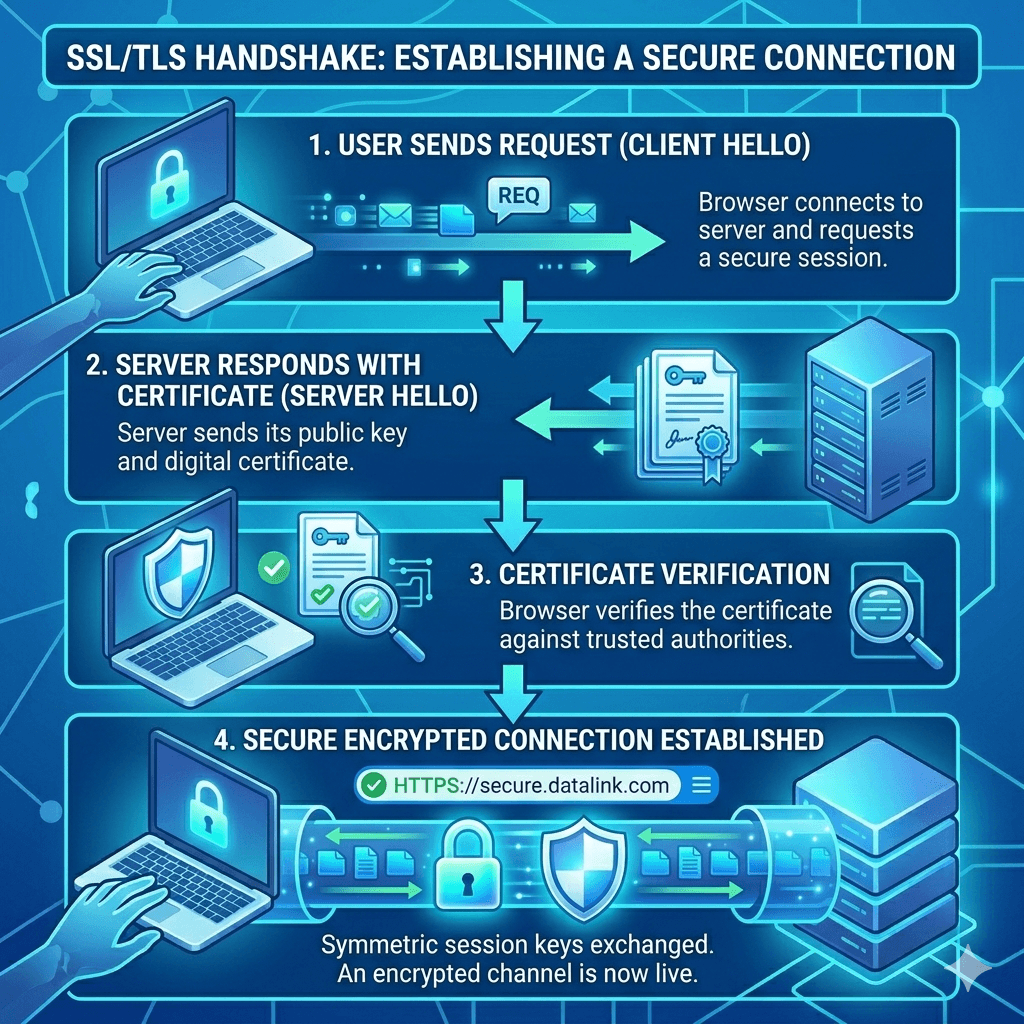
SSL certificates use a process called a “handshake” to establish a secure connection. Here is a simple breakdown of how it all works:
Data Encryption Process
When a visitor lands on your HTTPS website, their browser and your server exchange a series of messages to agree on an encryption method. This happens in milliseconds and is invisible to the user. Once agreed, all data sent between the browser and server is scrambled into an unreadable format using a unique encryption key. Even if someone intercepts the data, they see nothing but gibberish.
Authentication of Website Identity
SSL certificates are issued by trusted organizations called Certificate Authorities (CAs). When your server presents the SSL certificate to a visitor’s browser, the browser checks whether the certificate was issued by a trusted CA, whether it matches your domain name, and whether it has expired. This authentication process confirms that the visitor is actually on your legitimate website and not a fake impersonation.
Secure Data Transmission
Once the handshake is complete, secure data transmission begins. All information from login credentials to payment details to contact form submissions travels between the browser and the server in encrypted form. This is the foundation of data encryption website security and why it matters for both your business and your users.
Why HTTPS Matters for Uganda Websites
Uganda’s digital economy is growing fast. More businesses are moving online, and Ugandan consumers are increasingly comfortable shopping, banking, and communicating via the internet. In that context, website security is not just a technical issue it is a business issue.
If you run an e-commerce site and want to accept mobile money payments on your Uganda website, HTTPS is non-negotiable. Payment processors, banks, and mobile money platforms require secure connections before they will integrate with your site.
Beyond payments, Ugandan internet users are becoming more security-aware. They check the address bar. They notice the “Not Secure” warning. A website without HTTPS sends a signal that you have not invested in your visitors’ safety and that can directly hurt your conversion rates.
There is also the issue of cart abandonment. A lack of HTTPS is one of the leading reasons online shoppers abandon purchases. Addressing this is part of a broader strategy to reduce cart abandonment on your Ugandan online store.
For https for Uganda websites to become the norm, every website owner needs to take this seriously whether you run a small NGO website or a large corporate portal.
Benefits of Using HTTPS
Switching to HTTPS is one of the best investments you can make for your website. Here is why:
Improved Website Security
HTTPS protects your website from man-in-the-middle attacks, where hackers intercept communication between your visitor and your server. It also prevents data tampering ensuring the content your visitor sees is exactly what you sent. These website security tips alone make HTTPS worth it.
Better SEO Rankings
Google confirmed that HTTPS is a google https ranking factor as far back as 2014, and its importance has only grown since. A secure website ranks better than an equivalent HTTP site, all else being equal. If you want to know how to get your Ugandan business on the first page of Google, switching to HTTPS is one of the first steps. In fact, if your Uganda business website is not showing on Google, the lack of HTTPS could be a contributing factor.
Increased User Trust
The padlock icon in the address bar builds immediate confidence. According to multiple studies, users are significantly more likely to complete a purchase or fill in a form on a secure site. This ties directly into how to design a website that builds trust with Ugandan customers HTTPS is a foundational element of that trust.
Protection of User Data
Any time a visitor submits their name, phone number, email, or payment information on your website, that data needs protection. HTTPS encrypts all of it. This is especially critical for websites that serve clients in regulated industries like healthcare, finance, or education.
Risks of Using HTTP
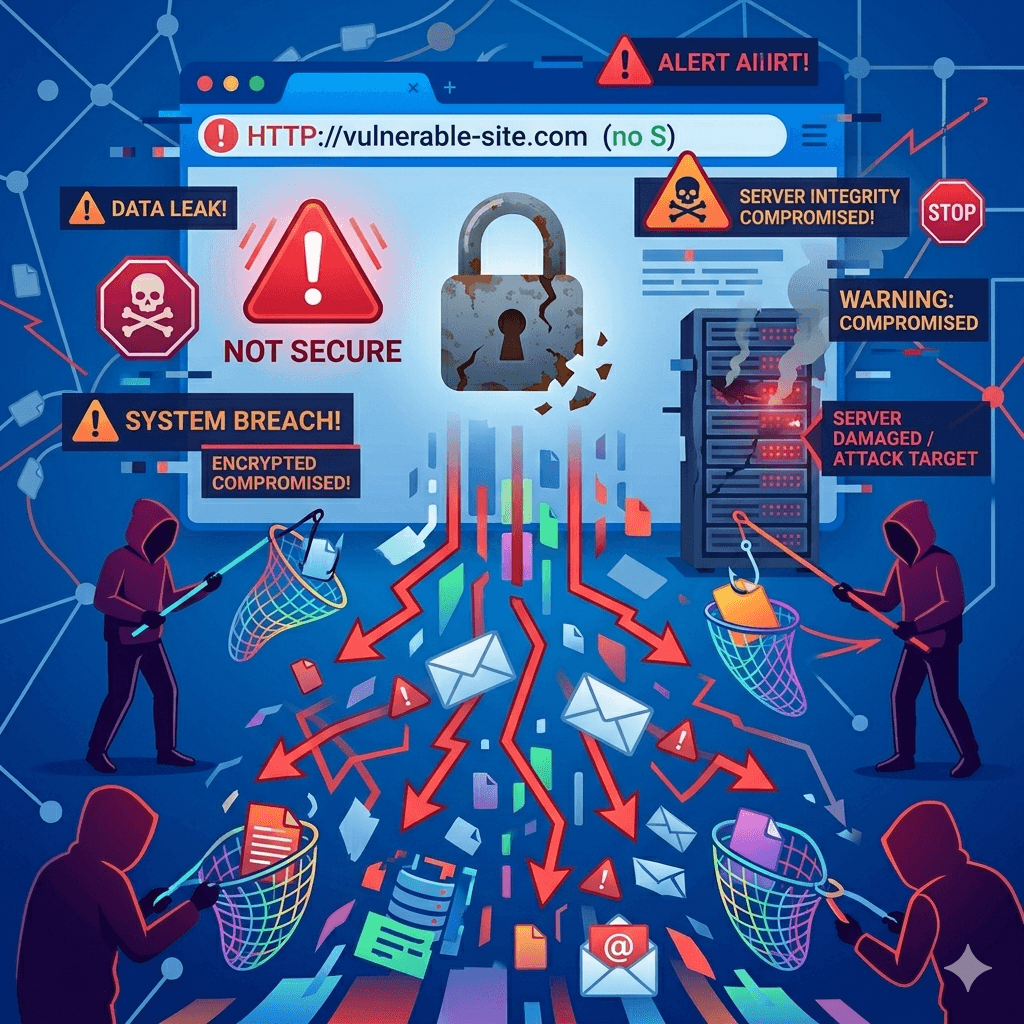
Still running your website on plain HTTP? Here is what you are risking:
• Browser warnings: Chrome, Firefox, and Safari all display a “Not Secure” warning for HTTP sites. Many visitors leave immediately when they see this.
• Data interception: Without encryption, any data entered by users passwords, emails, payment info can be captured by attackers on the same network.
• Lower search rankings: Google actively penalizes HTTP sites in rankings. This hurts your visibility and traffic.
• Lost credibility: Businesses that fail to secure their websites lose the trust of modern users who know what to look for.
• Legal and compliance risks: Collecting personal data over an unsecured connection can put you on the wrong side of data protection regulations.
The risks of staying on HTTP far outweigh any perceived convenience or cost savings.
How to Switch from HTTP to HTTPS
Making the switch from HTTP to HTTPS is not as complicated as it sounds. Here is a step-by-step guide for how to migrate from http to https step by step:
Choose the Right SSL Certificate
Start by selecting the type of SSL certificate that fits your needs. A basic Domain Validation (DV) certificate is fine for most small websites and blogs. Larger businesses or e-commerce sites may want Organization Validation (OV) or Extended Validation (EV). More on the types below.
Install the SSL Certificate
Most of the best web hosting providers in Uganda offer one-click SSL installation through their control panel. If you are on cPanel, look for the “SSL/TLS” section. Many hosts also offer free SSL through Let’s Encrypt, which installs automatically.
Update Website URLs
Once SSL is installed, update all internal links, image paths, and embedded resources on your website from http:// to https://. In WordPress, you can do this through your site settings or with a plugin like Better Search Replace.
Set Up Redirects (301 Redirects)
Configure 301 redirects to automatically send visitors and search engines from your old HTTP URLs to the new HTTPS versions. This preserves your SEO rankings and ensures no one lands on an insecure page by mistake. You can do this through your .htaccess file or your hosting control panel.
Test and Verify HTTPS
After the switch, use tools like SSL Labs (ssllabs.com/ssltest) to verify that your certificate is installed correctly and your entire site loads over HTTPS. Check for any remaining HTTP resources that might trigger mixed content warnings.
Types of SSL Certificates
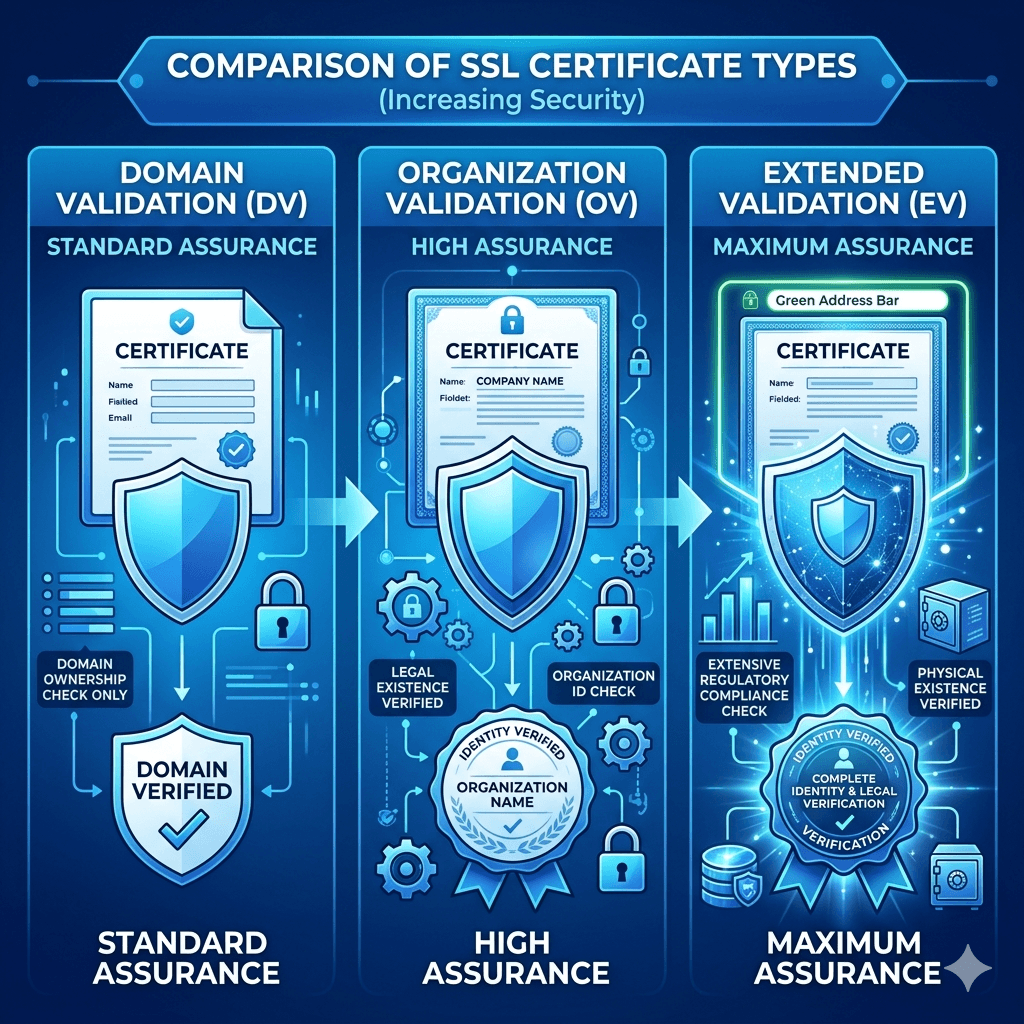
Not all SSL certificates are the same. Choosing the right one depends on your website’s purpose and the level of trust you need to establish:
Domain Validation (DV)
Domain Validation SSL is the most basic and most common type. It verifies that you own the domain but does not check any organizational details. DV certificates are issued quickly sometimes within minutes and are ideal for blogs, small business websites, and personal portfolios. Most free SSL certificates are DV certificates.
Organization Validation (OV)
Organization Validation SSL requires the Certificate Authority to verify your organization’s identity, including its legal existence and location. This adds a layer of credibility and is suitable for businesses that want to reassure users they are dealing with a legitimate company. OV certificates typically take a few days to issue.
Extended Validation (EV)
Extended Validation SSL is the highest level of verification available. CA checks your legal, physical, and operational existence thoroughly before issuing the certificate. EV certificates are most commonly used by banks, large e-commerce platforms, and organizations that handle highly sensitive data. They provide the highest level of user trust.
Common HTTPS Mistakes to Avoid
Switching to HTTPS is great but only if you do it properly. Here are the most common pitfalls:
Mixed Content Issues
This happens when your page loads over HTTPS, but some elements like images, scripts, or videos still load over HTTP. Browsers flag this as a security issue, and it can break your padlock icon. Always audit your pages after switching to ensure every resource loads securely.
Expired Certificates
SSL certificates have expiry dates, usually one year. An expired certificate causes browsers to display a scary security warning, driving visitors away instantly. Set calendar reminders or enable automatic renewal through your hosting provider.
Incorrect Redirects
Poorly configured redirects can create redirect loops, send users to the wrong pages, or result in duplicate content issues that hurt your SEO. Always test your redirects thoroughly after setup.
Ignoring Security Warnings
If your browser or security tools flag an issue with your SSL setup, do not ignore it. Investigate and fix it promptly. A broken or misconfigured HTTPS is sometimes worse than none at all, because it creates false confidence.
Cost of SSL Certificates in Uganda
One of the biggest barriers people cite for not switching to HTTPS is cost but the truth is, SSL certificates are more affordable than most people think.
Free SSL certificates: Let’s Encrypt offers free SSL certificates that are valid for 90 days and automatically renewable. Most reputable hosting providers offer these at no extra charge. This is the best free ssl certificate option for beginners and small websites.
Paid SSL certificates: For businesses that need OV or EV certificates, ssl certificate cost in Uganda typically ranges from a few hundred thousand to a few million Uganda shillings per year, depending on the type and provider. Check website pricing in Uganda for guidance on what to budget.
For most Ugandan websites, especially small businesses, NGOs, and bloggers a free DV certificate is perfectly adequate.
Best Practices for Maintaining HTTPS
Getting HTTPS installed is the beginning, not the end. Here is how to keep it working properly:
Regular Certificate Renewal
Whether you use a free or paid certificate, make sure it renews before expiry. Most hosting providers offer automatic renewal to enable it. If you manage your own server, set up automated renewal using tools like Certbot.
Use Strong Encryption
Ensure your server is configured to use modern, strong TLS versions (TLS 1.2 or 1.3). Disable outdated protocols like SSL 3.0 and TLS 1.0, which have known vulnerabilities.
Monitor Website Security
Use security monitoring tools to check your website for vulnerabilities regularly. Google Search Console will also alert you if it detects security issues. Pair this with knowing how to back up your WordPress website backups are your last line of defence if something goes wrong.
Keep Software Updated
Outdated plugins, themes, and CMS versions are a common entry point for attackers. Regular updates, combined with HTTPS, significantly reduce your website’s attack surface. Consider a professional service if you need help with this our team offers dedicated
website maintenance services to keep your site secure and running smoothly.
Frequently Asked Questions
Is HTTPS necessary for small websites in Uganda?
Yes. Even if your website only has a contact form or collects email addresses, HTTPS protects that data. Beyond security, Google flags all HTTP sites as “Not Secure” regardless of size. It also affects your SEO rankings. There is no good reason to avoid HTTPS in 2024, especially when free options are widely available.
Does HTTPS improve Google rankings?
Yes. HTTPS is a confirmed ranking signal for Google. While it is not the most powerful factor, it does give HTTPS sites a measurable edge over equivalent HTTP sites. Combined with good content and local SEO, it contributes to better visibility. Read our guide on local SEO for Kampala businesses to understand how all the pieces fit together.
Can I get a free SSL certificate?
Absolutely. Let’s Encrypt provides free SSL certificates that are trusted by all major browsers. Many web hosting providers in Uganda include free SSL as part of their hosting packages. If yours does not, consider switching to a host that does or install it manually using Certbot.
What happens if my SSL certificate expires?
When an SSL certificate expires, browsers display a full-page security warning that effectively blocks visitors from accessing your site. This can cause a sudden and severe drop in traffic and damage your credibility. Always ensure your certificate is renewed before it expires.
How do I know if my website is secure?
Look at your website’s address bar. If it shows a padlock icon and the URL starts with https://, your site is secure. You can also use free tools like SSL Labs (ssllabs.com/ssltest) to get a detailed report on your certificate’s configuration and security rating.
Will HTTPS slow down my website?
Not meaningfully. In the early days of SSL, there was a slight performance cost. Modern TLS and HTTP/2 technology have eliminated that concern. In fact, HTTP/2 which requires HTTPS often makes websites load faster than they would over plain HTTP.
Do I need technical skills to install SSL?
Not necessarily. Most hosting providers in Uganda offer one-click SSL installation through their control panel. If you are on WordPress, installing SSL can be as simple as clicking a button and installing a redirect plugin. If you run into trouble, our team provides professional website development services to handle it for you.
How long does it take to switch to HTTPS?
For a simple website, the technical process can take anywhere from 30 minutes to a few hours. The bulk of the time goes into updating internal links, testing for mixed content, and setting up redirects. For larger, more complex websites, allow a full day and test thoroughly before going live.
Ready to Secure Your Website?
Switching from HTTP to HTTPS is one of the smartest moves you can make for your website and it is more accessible than ever. Whether you are just starting out or looking to upgrade an existing site, the benefits are clear: better security, better rankings, and more trust from your visitors.
If you need expert help setting up your website with HTTPS, or if you are starting from scratch, explore our web design services in Uganda or contact us for web design help today. You can also visit our blog for more guides on growing your online presence in Uganda.
Your website is your digital front door. Make sure it is safe, secure, and ready to welcome visitors with the lock firmly in place.